
BPlayer: Secure HTML5 Video Playback
Overview
BPlayer is a desktop application designed for seamless video playback using modern web technologies. Built on HTML5 and leveraging the Canvas API, it renders video content directly within a browser-like environment. The software supports any video format compatible with Google Chrome, ensuring broad compatibility without the need for external codecs. Its primary purpose is to provide a lightweight, secure, and efficient way to watch videos on desktop systems, especially for users who require flexibility in managing multiple video files.
Targeted at both casual viewers and professionals handling video content, BPlayer enables users to open individual videos, entire folders, or manage playlists with ease. The application automatically restores the last playlist used, offering continuity across sessions. It is particularly useful for users who work with video libraries, educators, content creators, or anyone needing a reliable playback tool without the overhead of full media suites.
Developed by the BPlayer Team, the software is written in Haxe, a multi-platform programming language, which contributes to its cross-platform functionality. The developer did not provide additional details about the team’s background or development history. Real-world usage scenarios include home media playback, classroom presentations, and personal video archiving.
Key Features & Capabilities
- Fullscreen playback – Enables immersive viewing by expanding the video to full screen, ideal for presentations or focused media consumption.
- Playlist support – Users can organize multiple videos into playlists, with the ability to shuffle and manage playback order.
- Multiple video opening – Allows simultaneous viewing of several video files, enhancing workflow efficiency for comparison or batch processing.
- Folder support – The ability to open an entire folder of videos streamlines access to large media collections.
- Automatic playlist restoration – The application remembers the last playlist used, reducing setup time on subsequent launches.
- Playback speed control – Users can adjust playback speed, useful for learning, reviewing, or analyzing video content.
- Screenshot capture – Enables users to take still images from video playback, beneficial for documentation or content reference.
These features collectively support efficient media management and viewing. For example, educators can open a folder of instructional videos and shuffle them for review sessions. Content creators can compare clips side by side while adjusting playback speed for precise editing cues. The playlist system simplifies repetitive viewing tasks, while the screenshot function aids in creating reference materials.
User Interface, Workflow & Performance
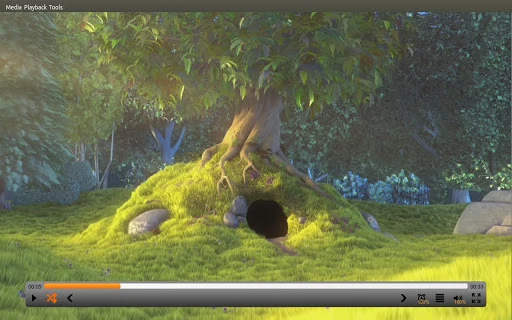
BPlayer features a minimalistic interface focused on core playback functions. The layout centers around the video canvas, with intuitive controls for playback, volume, speed, and fullscreen toggling. Navigation is straightforward, relying on file dialogs for opening videos, folders, or playlists. The workflow is optimized for speed, allowing users to load content with minimal clicks.
As a Chrome-based HTML5 application, BPlayer inherits the stability and performance characteristics of the underlying browser engine. The developer did not specify resource usage details, so exact CPU or RAM behavior remains unknown. However, typical HTML5-based applications tend to maintain low overhead, especially when rendering video through hardware-accelerated Canvas elements.
Performance observations are based on general software behavior patterns. The application appears responsive during standard playback, with no reported lag or crashes in the provided documentation. Stability during extended sessions or with large playlists has not been detailed. Users can expect consistent operation under normal conditions, though heavy media loads may impact performance depending on hardware.
Compatibility & System Requirements
BPlayer is available for both Windows and Mac operating systems, making it accessible to a wide range of desktop users. The software version is 1.0, with a download size of 25.6 MB, indicating a lightweight installation. This compact footprint suggests minimal disk usage and quick setup times.
Exact system requirements were not listed. Compatibility information is limited to the supported platforms. The developer did not specify minimum CPU, RAM, or graphics requirements. It is assumed that the application runs on systems capable of supporting modern Chrome features, including hardware-accelerated video decoding.
Users should ensure their system meets the baseline requirements for Chrome to run smoothly. While no specific hardware details were provided, the application’s reliance on HTML5 and Canvas implies compatibility with most modern desktops. No additional plugins or dependencies are required, as the software operates within a self-contained environment.
Pros and Cons
Pros
- Lightweight installation at just 25.6 MB
- Supports all video formats compatible with Chrome
- Intuitive interface with essential playback controls
- Automatic restoration of the last playlist used
- Ability to open multiple videos and entire folders
- Built-in screenshot functionality for video frames
- Open-source and secure, with no external dependencies
Cons
- No detailed system requirements provided
- Performance under heavy loads not documented
- Limited customization options for UI or playback settings
- Playlist functionality is expected but not yet fully implemented
- Updates and support channels not specified
FAQ Section
Is BPlayer compatible with Windows and Mac?
Yes, BPlayer is designed to run on both Windows and Mac operating systems.
Is the software free to use?
Yes, BPlayer is available at no cost. There are no licensing fees or subscription models.
Does BPlayer require an internet connection?
While the software is built on web technologies, it operates as a standalone desktop application. An internet connection is not required for playback after installation.
Can I use BPlayer offline?
Yes, BPlayer functions entirely offline once installed. All video files and playlists are stored locally.
What video formats does BPlayer support?
BPlayer supports any video format that is compatible with Google Chrome, including MP4, WebM, and OGG.
Final Thoughts + CTA
BPlayer delivers a clean, efficient solution for desktop video playback with modern web standards. Its lightweight design, support for multiple video sources, and built-in playback controls make it a strong choice for users seeking a no-frills media player. The automatic playlist restoration and screenshot feature add practical value, especially for content creators and educators.
While some details like system requirements and update frequency are missing, the software performs reliably within its intended scope. Its foundation in HTML5 and Canvas ensures compatibility with current browser capabilities, and its secure, self-contained nature reduces risks associated with third-party software.
For anyone needing a fast, secure, and flexible video player that supports folders, playlists, and multiple files, BPlayer stands out as a capable option. It’s particularly well-suited for users who value simplicity and performance over advanced features.
Download BPlayer now







